
New Arrival
Skip to product information


Features
The DJI Osmo Mobile 8P Advanced Tracking Combo is an advanced smartphone gimbal stabiliser designed for smooth handheld video recording, mobile filmmaking, vlogging, and content creation. Featuring intelligent tracking, 3-axis stabilisation, and a compact foldable design, it helps capture stable cinematic footage with both iPhone and Android smartphones. The Advanced Tracking Combo includes the DJI OM Multifunctional Module 2.
WONDERS IN YOUR PALM
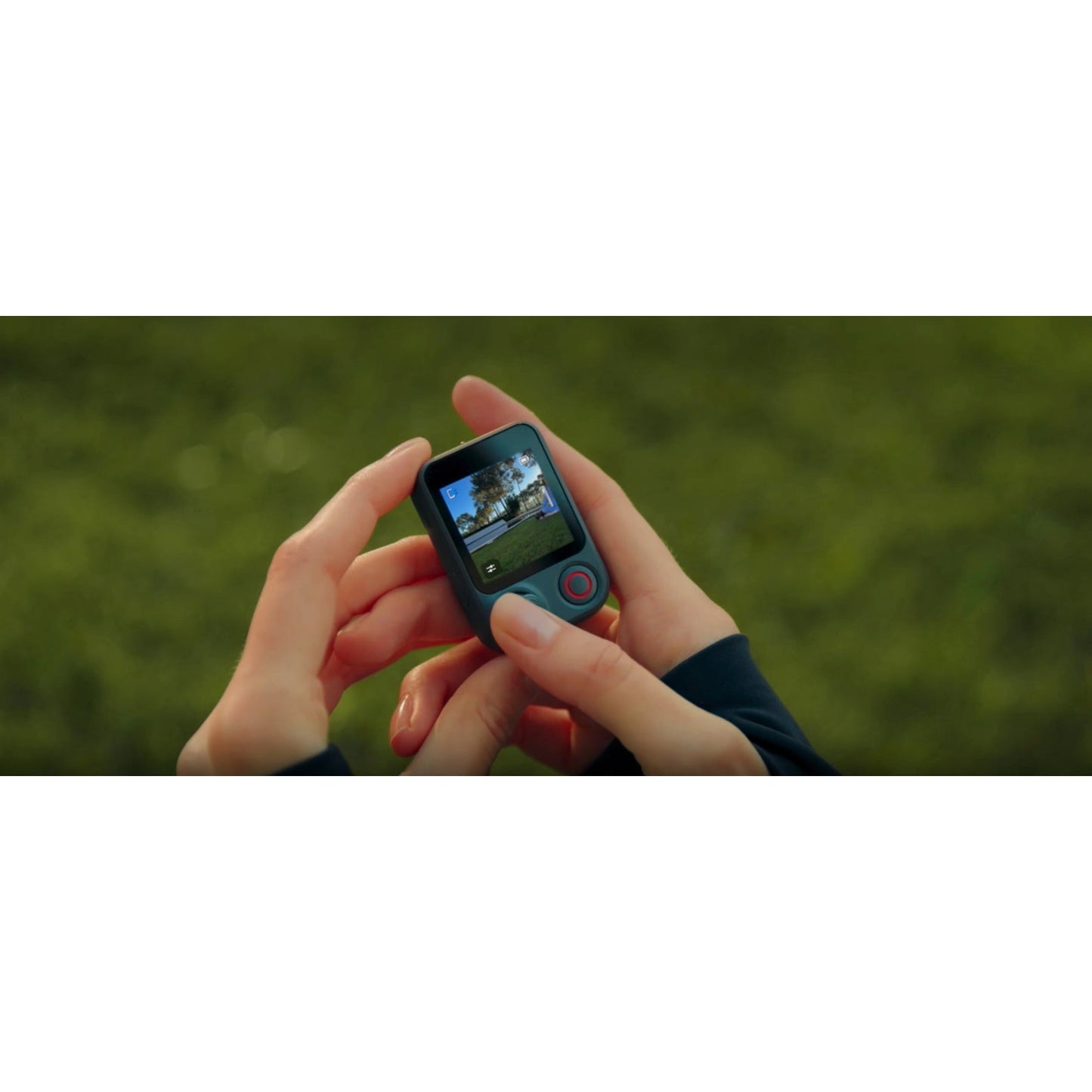
Unlock pro framing with the detachable Osmo FrameTap remote. Tracking is more robust than ever: navigate complex crowds [1] with ActiveTrack 8.0 [2], or lock onto any object [3] via Module 2. With Apple DockKit [4], extend tracking to your favourite apps. The Osmo Mobile 8P follows your passion with flagship precision.
COMPOSITION IN YOUR HANDS
Remote Control Selfies, Precise Framing
The new Osmo FrameTap mirrors the view from your phone or the Multifunctional Module 2 [2]. Frame rear-camera selfies or shoot from afar with your composition fully under control.
Tap To Track [17]
The remote screen automatically frames subjects with detection boxes. Simply tap a box to lock focus and begin tracking [17]. Effortlessly switch between different subjects by tapping on their detection boxes [17]. It's intuitive and responds instantly.
Adjust the Lighting
Adjust Multifunctional Module 2's [6] fill light directly from Osmo FrameTap. With eight brightness levels and eight colour temperature settings, you can fine-tune the lighting to match any environment, ensuring natural and radiant portraits.
Intuitive Joystick Control
Control gimbal movement, zoom, and the fill light on the Multifunctional Module 2 [6] with your thumb. The gear-free design ensures smooth, precise response for natural camera moves and professional results.
Snap On, Snap Off
Attach or remove the remote quickly. Use it on the handle for one-handed filming or hold it separately for more flexible framing. The magnetic design connects instantly and holds secure, working smoothly in every scenario.
UPGRADED TRACKING FOR ALL YOUR SUBJECTS
Expanded & Enhanced Subject Tracking
Locks on To Anything [7]
The new Multifunctional Module 2 [6] tracks more than people, cats, or dogs. It follows general objects [3] too. From collectables to sleek cars to landmarks, Osmo Mobile 8P keeps them centred. Highlight and switch focus as your story unfolds. Upgraded ActiveTrack 8.0 [1] delivers steadier tracking in crowded venues like exhibitions [6].
Direct Phone Connection for Native Tracking [3]
Quick Start With Apple DockKit [4]
Start filming when inspiration hits. Simply tap your phone[4] on the NFC area of the gimbal to pair via Bluetooth. Once magnetically attached, seamless tracking begins.
ActiveTrack 8.0 [2], Unwavering Focus
ActiveTrack 8.0 [2] brings a new level of agility to your lens. Step into a packed concert, a bustling exhibition, or a frantic sports arena. Even here, your subject stays front and centre [1]. It handles obstructions and fast shifts with ease, keeping your subject firmly in view.
Intelligent, Reliable Tracking
Wherever you go, the camera follows. Osmo Mobile 8P adapts to diverse scenarios to keep your subject clear. No matter how you move or change direction, the gimbal automatically detects and follows your movements, keeping you in the spotlight at all times. Wide-angle and telephoto lenses team up to track fast-moving subjects across a larger area [8]. Even if your subject moves out of frame, the Mimo app automatically brings them back. Whether it's skateboarding or basketball, you'll always capture the action, smooth, steady, and in every exciting moment.
INTEGRATED DESIGN, READY TO CREATE
Osmo Mobile 8P features a built-in extension rod and tripod for instant versatility. Add the Multifunctional Module 2 [6] for a handy fill light setup.
Fill Light
The fill light on the Multifunctional Module 2 [6] features eight brightness levels and eight colour temperature settings. Whether you're shooting on a rainy day or live streaming in low light, you can create the perfect look and mood every time.
Built-in Extension Rod
The built-in extension rod expands your field of view, allowing you to fit more friends, pets, or stunning scenery into every selfie. When vlogging, your videos also become richer and more visually engaging from overhead to low angles.
Built-in Tripod
Integrated directly into the handle, the tripod means no extra gear to carry. The updated design opens wider for enhanced stability on various surfaces [9] so you can set up and record with confidence.
Power Through Every Moment
Osmo Mobile 8P is built to last, offering up to 10 hours [5] of operating time, so it supports your recording and creative pursuits all day long. With a USB-C port, the gimbal can also charge your phone, which is ideal for extended outdoor filming and live streaming.
MASTER MOBILE MOVEMENT
Next-generation stabilisation creates a solid foundation, while intuitive modes give you creative freedom. Together, they ensure your footage looks smooth and deliberate.
Robust 3-Axis Gimbal Stabilisation
Stabilisation Evolved
With boosted motor power, 8th-generation stabilisation elevates both daily clips and pro creations. Whether filming low to the ground or switching angles, Osmo Mobile 8P keeps footage steady.
PTF
In PTF mode, the camera view follows the gimbal's pan and tilt movements and stays stable during rolls. This mode is great for shooting up, down, and diagonally.
FPV
In FPV mode, all three axes of the gimbal follow the movement of the main body. This is wonderful for dynamic filming of still subjects like landmarks, buildings, or statues.
PF
The camera view only follows the gimbal's pan movements and stays stable during tilts and rolls, making it ideal for shooting horizontally or moving around a subject.
SpinShot
Push the joystick to the left or right to control the rotation of the camera view and create dynamic footage. Perfect for shooting push, pull, and high-angle movements.
10-Hour Battery Life [4] & Phone Charging
Osmo Mobile 8P offers up to 10 hours [4] of operating time. With a USB-C port, the gimbal can also charge your phone - ideal for extended outdoor filming and live streaming.
Low-Angle Shots & 360° Pan Rotation
Tilt the pan axis forward to unlock lower-level shots, ideal for tracking kids and pets. With unlimited 360° horizontal rotation, you can easily capture smooth panoramic photos and videos.
Built-in Extension Rod & Tripod, Folds With Ease
The extension rod expands your field of view for richer selfies and vlogs, while the upgraded tripod features a wider stance for enhanced stability when placed down [7].
Easy Tutorials & One-Tap Editing
Effortlessly capture and edit using the Mimo app. ShotGuides analyzes your scene to recommend sequences and tutorials. One-Tap Editing helps you get epic videos easily.
CREATIVE MODES, CINEMATIC FLAIR
Add a creative spark to your moments. The Mimo app provides rich cinematic modes that turn simple operations into professional-grade effects.
360° Infinite Spin
Osmo Mobile 8P's pan axis supports unlimited 360° horizontal rotation, giving you the freedom to capture smooth panoramic photos and videos from any angle. Combined with intelligent tracking, the gimbal can continuously lock onto moving subjects, delivering seamless, professional-looking footage.
Low-Angle Shots
Tilt the pan axis forward to shoot from a lower level and unlock a fresh, creative perspective. The Multifunctional Module 2 [6] enables the gimbal to automatically follow children, cats, dogs, and general objects [3], so you can easily capture their cuteness from their own eye level.
Slow Shutter
Capture light trails where stillness and motion interplay to create dreamy, surreal images. This mode excels in night scenes or low-light conditions, allowing you to paint with light for truly artistic effects.
Action Shot
Track fast-paced movement. Draw a box around an athlete or a dancer, and the gimbal responds quickly to keep them in the frame, ensuring high-energy moments remain fluid.
DynamicZoom
Use Move In and Move Out modes to get stretching and compressing visual effects to create dynamic blockbuster shots with your phone.
Widescreen
Record directly in the classic 2.35:1 format to give your daily footage an instant cinematic polish. By capturing this wide aesthetic straight from the camera, you achieve a professional movie texture without needing to crop later.
START EASILY WITH DJI MIMO
Gesture Control
Enable Gesture Control in the Mimo app and select Follow & Shoot. Then make a "V" or "Palm" gesture to activate ActiveTrack and start recording [16].
Composition Assist
In ActiveTrack mode, enable Composition Assist and use Golden Ratio overlays to guide your framing. This helps keep your subject perfectly balanced for a professional aesthetic.
Built-in Filters
Apply themes like Retrofilm, Gourmet, or Portrait to enhance colours. Support for LUT imports and real-time previews lets you define your style instantly.
One-Tap Editing
The DJI Mimo app supports AI-powered one-tap editing and a range of exclusive video templates. It's a one-stop solution that is friendly for new creators.
ShotGuides
ShotGuides automatically analyses your scenario and recommends a shot sequence, along with a tutorial for how to get it. Choose from a range of templates, follow the instructions, and shoot like a pro in no time.
DON'T FORGET ACCESSORISE
Snap your iPhone on instantly with the Magnetic Quick-Release Mount [10]. Add DJI Mic Mini 2 [11] to capture high-quality audio that matches your video perfectly. Round it out with the Tracking Kit [12] or other handy accessories to make mobile shooting easier than ever.
Notes
1. Tracking continuity may be affected by strong coloured lighting (causing loss of subject colour features) or multiple subjects with virtually identical appearances.
2. ActiveTrack 8.0 is only available within the DJI Mimo app.
3. Object Tracking via the Multifunctional Module 2 (excluding people/animals/vehicles): Requires manual box selection. Effective range varies based on object size. The object must have clear outlines, high contrast against the background, and occupy more than 10% of the frame.
4. For compatibility information, refer to the smartphone compatibility list on the official DJI website.
5. Measured with the gimbal balanced, level, and stationary, using only the remote controller (Osmo FrameTap) and no other accessories. The test consisted of 4 hours with the remote detached from the gimbal (connected via Bluetooth, no operations performed) and 6 hours with the remote attached to the gimbal.
6. The DJI OM Multifunctional Module 2 features a built-in fill light. It is not included in the Osmo Mobile 8P Standard Combo and is sold separately (included with Advanced Tracking & Creator Combo).
7. The DJI OM Multifunctional Module 2 supports tracking human subjects, cats, dogs, objects, and vehicles. Object Tracking via the Multifunctional Module 2 (excluding people/animals/vehicles): Requires manual box selection. Effective range varies based on object size. The object must have clear outlines, high contrast against the background, and occupy more than 10% of the frame.
8. Only available on iPhone 13 Pro, iPhone 13 Pro Max, and later Pro and Pro Max models.
9. The built-in tripod is suitable for stable, level surfaces in windless environments.
10. Sold separately. Only supports iPhone 12 and later models; compatible with Apple's official iPhone cases with MagSafe, allowing for easy use without removing the case.
11. DJI Mic Mini 2 is not included in certain combos and is sold separately.
12. Sold separately.
13. Currently, only Apple Watch is supported. For compatible Apple Watch models and app instructions, check the FAQ section.
14. The weight of Osmo Mobile 8P includes the gimbal, built-in tripod, Magnetic Phone Clamp 5, Multifunctional Module 2, and Osmo FrameTap. The weight of Osmo Mobile 8/Osmo Mobile 7P includes the gimbal, built-in tripod, magnetic phone clamp, and multifunctional module. The weight of Osmo Mobile 7 includes the gimbal, built-in tripod, and magnetic phone clamp. Actual weight may vary slightly. Please refer to the final delivered product for precise details.
15. Measured with the gimbal balanced in a level and stationary state without additional accessories.
16. ActiveTrack Gesture Control requires the user to be 0.5 to 4 m from the camera, facing the camera, and holding the gesture for 1 to 2 seconds. The Mimo app will detect the gesture and track the person closest to it.
17. The Feature is only available when casting DJI OM Multifunctional Module 2's view to Osmo FrameTap.
DJI Warranty Information
Manufacturer's warranty for DJI products may vary depending on the part under question, batteries have 3-6 months manufacturer's warranty while the remote control might have 12 months manufacturer's warranty. More information can be found on the DJI Website.
Specifications
Osmo Mobile 8P Gimbal
Osmo FrameTap: Supported
Mirroring/Live View: Phone Screen Mirroring & FrameTap/Apple Watch Live View
Gimbal Weight: Approx. 386 g
Operating Time: Approx. 10 hours
Tracking Module: DJI OM Multifunctional Module & Multifunctional Module 2
Multi-Level Fill Light: Supported
DJI OsmoAudio: Supported
Unlimited 360° Pan Rotation: Supported
Apple DockKit: Supported
Built-in Extension Rod: Yes
Built-in Tripod: Split Design, Unfolded Radius of 97 mm
Quick Launch: Supported
General
Dimensions: Unfolded: 291×110×101 mm (L×W×H)
Folded: 196×105×38 mm (L×W×H)
Weight: Gimbal + Built-in Tripod + Magnetic Phone Clamp 5 + Multifunctional Module 2 + Osmo FrameTap: Approx. 386 g
Data was collected in a controlled environment. Actual experience may vary.
Extension Rod: Built-in Extension Rod - Max Extension Length: 215 mm
Compatible Phone Weight: 170-300 g
Compatible Phone Thickness: 6.9-11 mm
Compatible Phone Width: 67-84 mm
Bottom Port: 1/4″-20 UNC port
Tripod
Dimensions: Built-in Tripod
Length: 82 mm
Battery
Type: Li-Po 1S
Capacity: 3350 mAh
Energy: 12.06 Wh
Charging Temperature: 5° to 40° C (41° to 104° F)
Operating Temperature: 0° to 40° C (32° to 104° F)
Operating Time: Approx. 10 hours*
* Measured with the gimbal balanced, level, and stationary, using only Osmo FrameTap and no other accessories. The test consisted of 4 hours with FrameTap detached from the gimbal (connected via Bluetooth, no operations performed) and 6 hours with FrameTap attached to the gimbal.
** With the DJI OM Multifunctional Module's intelligent tracking feature enabled and the fill light off, the operating time is approximately 4.5 hours. When the intelligent tracking feature is on and the fill light is set to maximum brightness, the operating time is approximately 3 hours.
*** With the DJI OM Multifunctional Module 2's intelligent tracking feature enabled and the fill light off, the operating time is approximately 5 hours. When the intelligent tracking feature is on and the fill light is set to maximum brightness, the operating time is approximately 4 hours.
Using the gimbal to charge your smartphone will shorten the gimbal's operating time.
Charging Time: Approx. 2.5 hours
Measured under laboratory conditions at 25° C (77° F), using the DJI 65W Portable Charger, charging from 0% to 100% while the device was powered off. Data is for reference only. Actual performance may vary.
Gimbal Charging Port: USB-C
Phone Charging: Supported
Gimbal
Controllable Range: Pan: 360° (unlimited rotation)
Roll: -52° to 256°
Tilt: -37° to 55°
Mechanical Range: Pan: 360° (unlimited rotation)
Roll: -77° to 255°
Tilt: -224° to 100°
Max Control Speed: 90°/s
Wireless Mode
Model: Bluetooth 5.3
Software
App: DJI Mimo
Multifunctional Module 2
Fill Light Illuminance: 40 lux
This represents the maximum brightness measured at a distance of 0.6 metres from the subject and should be used for reference only.
Fill Light Colour Temperature: 2500-6500 K
Osmo FrameTap
Wi-Fi Video Transmission Distance: 25 m
The Wi-Fi video transmission distance was measured to be over 25 metres when tested with an iPhone 14 and OPPO Find X8 Ultra in an open, unobstructed environment free of interference. Performance may vary depending on phone brands or models. Please refer to your actual experience.sup>
Wi-Fi Protocol: 802.11 a/b/g/n/ac/ax
Wi-Fi Operating Frequency: 2.400-2.4835 GHz
5.725-5.850 GHz
Operating frequency allowed varies according to country/region. Please refer to local laws and regulations for more information.sup>
Wi-Fi Transmitter Power (EIRP):
2.4 GHz: < 20 dBm (CE/SRRC/MIC)
5.8 GHz: < 23 dBm (SRRC), < 14 dBm (CE)
Bluetooth Video Transmission Distance: 10 m
Measured in an unobstructed environment free of interference.
Bluetooth Protocol: Bluetooth 5.4, BR/EDR
Bluetooth Operating Frequency: 2.400-2.4835 GHz
Bluetooth Transmitter Power (EIRP): < 10 dBm
Touchscreen: Size: 1.4 inches
Resolution: 240×240
Brightness: 800 cd/m² ± 10%
Frame Rate: 60 Hz
Battery: Li-Po 1S
Charging Time: 2.5 hours
Measured under laboratory conditions at 25° C (77° F), using the DJI 65W Portable Charger, charging from 0% to 100% while the device was powered off. Data is for reference only. Actual performance may vary.
Operating Time: Up to 4.5 hours in standby mode (device powered on, no user operations)
Operating Temperature: 0° to 40° C (32° to 104° F)
Storage Temperature: 10° to 30° C (50° to 86° F)
Charging Temperature: 5° to 40° C (41° to 104° F)
GNSS: GPS L1 + Beidou B1 + Galileo E1 + QZSS L1 + GLONASS G1
Dimensions: 53×37×19 mm (L×W×H)
Weight: 29 g
Data was collected in a controlled environment. Actual experience may vary.
Waterproof: NOT waterproof
What's in the Box
1x Osmo Mobile 8P Gimbal
1x DJI OM Magnetic Phone Clamp 5
1x DJI OM Multifunctional Module 2
1x Osmo FrameTap (Detachable Touchscreen Remote Control)
1x Power Cable (USB-C to USB-C, 50 cm)
1x Phone Charging Cable (USB-C to USB-C, 15 cm)
1x Storage Pouch
1x Quick Start Guide
1x Safety Guidelines
*Please note: Smartphone not included
Let’s Answer Your Questions
Can I use the DJI OM 7 Series Magnetic Phone Clamp and the DJI OM Multifunctional Module with Osmo Mobile 8P?
Yes.
1. Osmo Mobile 8P can be used with the DJI OM 7 Series Magnetic Phone Clamp.
2. Osmo Mobile 8P can be used with the DJI OM Multifunctional Module. However, please note that only the DJI OM Multifunctional Module 2 supports video transmission to Osmo FrameTap. If you use the first-generation module, you won't be able to view its feed on the remote screen.
What improvements does Osmo Mobile 8P offer compared with Osmo Mobile 8?
Osmo Mobile 8P has been upgraded in several areas, including the following:
1. New Osmo FrameTap. This detachable touchscreen remote controller allows you to:
a. Adjust gimbal parameters and switch shooting modes.
b. Control the Multifunctional Module. Swipe right to view the live feed from the Multifunctional Module. Press the joystick once or draw a box on the screen to instantly lock onto your subject.
c. Control the gimbal from up to 10 meters away to take photos, record video, switch between portrait/landscape, and fine-tune your composition.
d. Android phone users can mirror their phone screen to the Osmo FrameTap remote directly. iPhone* users can mirror their phone screen to the remote via the DJI Mimo app.
2. Supported by the new DJI OM Multifunctional Module 2 (not included in the Standard combo and is sold separately), the device can now track vehicles and any general object**.
3. The new DJI OM Magnetic Phone Clamp 5 is smaller, lighter, and more secure. It offers wider compatibility and features optimized rubber padding to ensure it covers less of your phone screen.
4. The tripod design has been optimized with three legs that can be spread out independently, ensuring a steadier setup on flat surfaces.
* Please visit the official DJI website for the full smartphone compatibility list.
** Object Tracking via the Multifunctional Module 2 (excluding people/animals/vehicles): Requires manual box selection. Effective range varies based on object size. The object must have clear outlines, high contrast against the background, and occupy more than 10% of the frame.
Which smartphones are compatible?
Osmo Mobile 8P is compatible with most smartphones on the market. It is recommended to use smartphones with a width of 67-84 mm, thickness of 6.9-11 mm, and weight of 170-300 g.
Please visit the official DJI website for the full smartphone compatibility list.
What is the magnetic force?
The magnetic force of Osmo Mobile 8P is approximately 40 Newtons, which is strong enough to hold an object equivalent to the weight of two 2-liter soda bottles. This ensures a secure attachment for smartphones.
Is the gimbal waterproof?
Osmo Mobile 8P and Osmo FrameTap are not waterproof.
Can I use the magnetic phone clamp with my phone case on?
Yes, as long as the combined thickness of the smartphone and the case does not exceed 11 mm.
What is the size of the mounting hole at the bottom of the gimbal?
The mounting hole at the bottom of Osmo Mobile 8P is the standard 1/4″-20 UNC port, which is compatible with most tripods.
What are the functions of the USB-C ports on the roll axis and the handle of Osmo Mobile 8P?
1. The USB-C port on the roll axis of Osmo Mobile 8P is an output port. You can connect it to the Multifunctional Module 2, or use the Phone Charging Cable (15 cm) to connect the port to your phone so the gimbal can power your phone.
2. The USB-C port on the handle of Osmo Mobile 8P is for recharging the gimbal itself. Use the Power Cable (50 cm) to connect this port to a power adapter to recharge your Osmo Mobile 8P.
Which phones support NFC pairing with Osmo Mobile 8P?
Android phones* support NFC pairing and can automatically launch the DJI Mimo app for setup.
iPhone* supports Apple DockKit pairing via NFC.
After unlocking your iPhone, tap the NFC area on Osmo Mobile 8P to bring up the DockKit pairing prompt and connect.
Once paired for the first time, Osmo Mobile 8P will automatically reconnect to your phone in future uses, making the process quick and convenient without the need for repeated setup.
** Please find the full smartphone compatibility list here.
What's the difference between direct phone connection for effortless tracking, intelligent tracking with the DJI OM Multifunctional Module 2, and intelligent tracking in the DJI Mimo app?
Direct phone connection for effortless tracking allows you to pair your phone with the gimbal via NFC. After pairing, you can track people in the native camera app or any third-party app compatible with Apple DockKit. Please close the DJI Mimo app and remove the DJI OM Multifunctional Module when using this feature.
The Multifunctional Module 2 supports both iPhone and Android phones, allowing tracking of people, cats, dogs, vehicles, or general objects* in the native camera and third-party apps.
The DJI Mimo app, available for both iPhone and Android phones**, allows you to track people, pets, or any object. It also offers various tracking features like Dual Lens Boost, Smart Capture, and DynamicZoom.
* Object Tracking via the Multifunctional Module 2 (excluding people/animals/vehicles): Requires manual box selection. Effective range varies based on object size. The object must have clear outlines, high contrast against the background, and occupy more than 10% of the frame.
** Please find the full smartphone compatibility list here.
In which apps can the Multifunctional Module 2 enable smart tracking?
The Multifunctional Module 2 allows smart tracking in the following apps:
1. Your smartphone's native camera app, like using Cinematic mode on iPhones.
2. Live streaming on apps like TikTok, YouTube, and Instagram.
3. When used with mainstream camera apps like VSCO and B612.
4. During voice calls and video conferences.
5. When used with professional camera apps like Blackmagic Camera and Protake.
What improvements does the Multifunctional Module 2 of Osmo Mobile 8P have in intelligent tracking compared to the previous generation?
1. It can now track vehicles and any general object*.
2. It supports video transmission to Osmo FrameTap, allowing you to view the live feed and adjust tracking settings directly on the remote screen.
* Object Tracking via the Multifunctional Module 2 (excluding people/animals/vehicles): Requires manual box selection. Effective range varies based on object size. The object must have clear outlines, high contrast against the background, and occupy more than 10% of the frame.
What is Apple DockKit?
Apple DockKit is a subject-tracking technology developed by Apple. Osmo Mobile 8P supports DockKit, allowing iOS users to leverage this feature without additional apps or accessories. This enables intelligent subject tracking in the native iPhone camera app and in third-party iOS apps supporting DockKit, such as Facebook, YouTube, and Blackmagic Camera.
Warranty: 12 Months*
*Warranty period is as stated above unless the manufacturer has chosen to specify a longer period. All warranties are return to base unless otherwise specified.